Properties Guide

Properties Guide

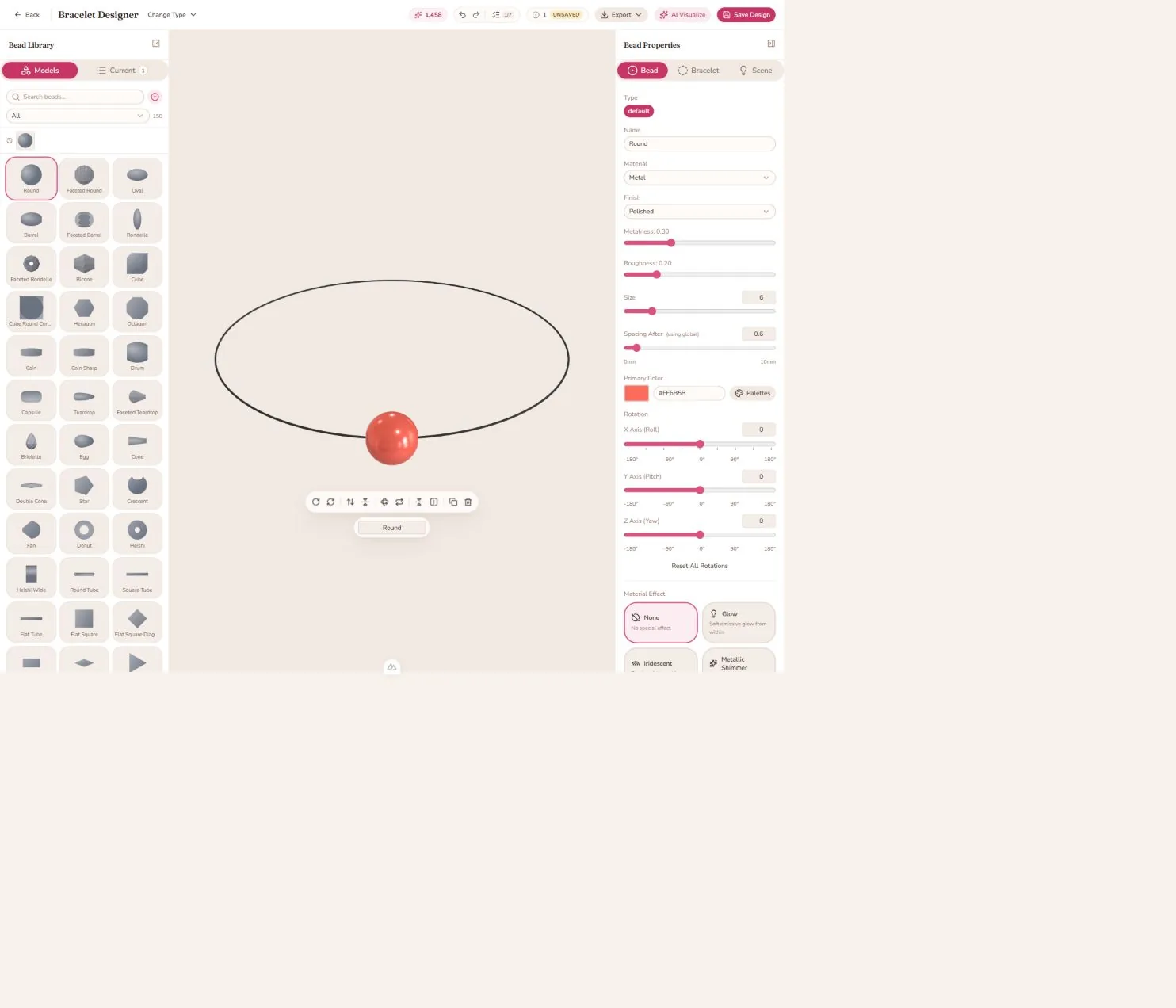
Every bead in BeadMod can be customized using various properties. This guide explains each property and how to use it effectively.

Size

Range: 0.5 - 3.0

Description: Controls the physical size of the bead in your design.

Usage Tips:

  • Small beads (0.5 - 1.0): Spacers, delicate accents
  • Medium beads (1.0 - 2.0): Standard bracelet beads
  • Large beads (2.0 - 3.0): Statement pieces, focal points

Design Ideas:

  • Gradually increase/decrease sizes for flow
  • Use large beads as centerpieces
  • Keep most beads similar size for uniform look
  • Mix sizes for dynamic, playful designs

Material Types

Metal

Characteristics:

  • High reflectivity
  • Cool, modern appearance
  • Professional look

Best For: Spacers, caps, accents Popular Finishes: Silver, gold, bronze, copper

Plastic

Characteristics:

  • Vibrant colors
  • Lightweight feel
  • Matte or glossy finish

Best For: Colorful designs, casual bracelets Advantage: Widest color range available

Translucent

Characteristics:

  • Light passes through
  • Glowing appearance
  • Depth and dimension

Best For: Ethereal designs, light play Tip: Looks stunning with backlight in studio mode

Glass

Characteristics:

  • Crystal-clear or colored
  • High shine
  • Elegant appearance

Best For: Sophisticated designs, formal bracelets Effect: Creates sparkle and brilliance

Wood

Characteristics:

  • Natural texture
  • Warm, organic feel
  • Earthy tones

Best For: Bohemian, natural designs Pairs Well With: Earth tones, nature themes

Ceramic

Characteristics:

  • Smooth surface
  • Matte or glazed finish
  • Artistic quality

Best For: Artistic designs, handcrafted look Advantage: Unique, artisanal appearance


Color

Control: Full color picker (RGB/Hex)

Understanding Color:

Color Theory Basics

  • Complementary Colors: Opposite on color wheel (blue & orange)
  • Analogous Colors: Adjacent on color wheel (blue, teal, green)
  • Monochromatic: Shades of one color

Color Schemes for Bracelets

Classic Elegance

  • Black and gold
  • Silver and white
  • Navy and pearl

Bold & Vibrant

  • Red and turquoise
  • Purple and yellow
  • Hot pink and lime

Natural & Earthy

  • Brown and green
  • Cream and tan
  • Sage and rust

Seasonal

  • Spring: Pastels (mint, pink, lavender)
  • Summer: Bright (coral, sky blue, yellow)
  • Fall: Warm (orange, burgundy, gold)
  • Winter: Cool (silver, icy blue, white)

Pro Tip: Use 2-3 main colors per design for cohesion.


Texture

Description: Adds surface detail to beads without changing shape.

Available Textures:

  • Smooth (default)
  • Hammered
  • Brushed
  • Crackle
  • Woven
  • Carved
  • Embossed

When to Use Textures:

  • Add visual interest to plain beads
  • Create contrast with smooth beads
  • Enhance realism
  • Match specific themes (e.g., hammered for rustic)

Texture Tips:

  • Don't over-texture - leave some smooth areas
  • Match texture to material (wood goes with carved)
  • Use texture for focal beads

Roughness

Range: 0 (smooth) - 1 (rough)

Description: Controls how matte or glossy the surface appears.

Low Roughness (0 - 0.3):

  • Polished, shiny appearance
  • Clear reflections
  • Elegant, formal look

Medium Roughness (0.4 - 0.6):

  • Satin finish
  • Subtle sheen
  • Versatile for most designs

High Roughness (0.7 - 1.0):

  • Matte finish
  • No reflections
  • Contemporary, sophisticated look

Material Guidelines:

  • Metal: Usually low (0.1 - 0.3)
  • Plastic: Medium (0.3 - 0.5)
  • Wood: High (0.6 - 0.8)
  • Glass: Very low (0 - 0.2)

Metalness

Range: 0 (non-metal) - 1 (pure metal)

Description: Controls how metallic the surface appears.

High Metalness (0.7 - 1.0):

  • Reflects environment strongly
  • Pure metallic look
  • Works with metal materials

Low Metalness (0 - 0.3):

  • Reflects less
  • More matte appearance
  • Works with plastic, wood, ceramic

When to Use:

  • Set to 1.0 for realistic metal beads
  • Set to 0 for non-reflective materials
  • Adjust 0.3-0.7 for painted metals or metallic paints

Interaction with Roughness:

  • High metalness + Low roughness = Polished chrome
  • High metalness + High roughness = Brushed metal
  • Low metalness + Low roughness = Glossy plastic
  • Low metalness + High roughness = Matte ceramic

Opacity

Range: 0 (transparent) - 1 (opaque)

Description: Controls how see-through the bead is.

Full Opacity (1.0):

  • Solid, non-transparent
  • Standard for most beads

Partial Opacity (0.3 - 0.7):

  • Translucent effect
  • Light passes through
  • Layered, ethereal look

Low Opacity (0.1 - 0.3):

  • Very transparent
  • Glass-like appearance
  • Creates ghostly effects

Creative Uses:

  • Frosted glass effect (0.5 - 0.7 opacity)
  • Stained glass look (0.4 opacity + bright color)
  • Ice/crystal effect (0.3 opacity + blue tint)
  • Gemstone appearance (0.6 opacity + color)

Combining Properties

Master designers combine properties for stunning effects:

Polished Gold

  • Material: Metal
  • Color: #FFD700
  • Roughness: 0.2
  • Metalness: 1.0
  • Opacity: 1.0

Frosted Glass

  • Material: Glass
  • Color: Any light color
  • Roughness: 0.4
  • Metalness: 0.0
  • Opacity: 0.6

Natural Wood

  • Material: Wood
  • Color: #8B4513
  • Roughness: 0.7
  • Metalness: 0.0
  • Texture: Carved

Gemstone

  • Material: Translucent
  • Color: Vibrant (emerald, sapphire, ruby)
  • Roughness: 0.1
  • Metalness: 0.0
  • Opacity: 0.7

Spacing

Range: 0mm - 10mm (per bead)

Description: Controls the gap between the current bead and the next bead in your design.

Global vs Individual Spacing

Global Spacing:

  • Set in the layout configuration (default: 2mm)
  • Applies to all beads that don't have custom spacing
  • Quick way to adjust overall bracelet density

Individual Spacing:

  • Override global spacing for specific beads
  • Set custom spacing for design variety
  • Create breathing room or tight groupings

Spacing Strategies

Tight Design (0 - 1mm):

  • Dense, compact look
  • Beads touch or nearly touch
  • Bold, substantial feel

Standard Spacing (1.5 - 3mm):

  • Comfortable balance
  • Shows string/cord between beads
  • Most versatile

Loose Spacing (4 - 10mm):

  • Airy, minimalist look
  • Emphasizes individual beads
  • Modern, contemporary feel

Smart Cap Spacing

Cap beads use intelligent automatic spacing:

When you add a cap bead:

  • Facing Right (default): Cap has 0mm spacing, sits flush with previous bead
  • Facing Left (flipped): Previous bead has 0mm spacing, cap sits flush against it

The system automatically adjusts when you flip the cap orientation using the Flip Left-Right button (or press V).

Visual Indicators:

  • Blue info hint shows current spacing configuration
  • "Cap facing right →" or "Cap facing left →" text
  • Real-time updates when you flip orientation

Spacing Tips

  1. Use consistent spacing for most beads (maintains rhythm)
  2. Reduce spacing before focal beads (draws attention)
  3. Increase spacing after statement pieces (gives them room to breathe)
  4. Zero spacing for clusters (group related beads)
  5. Cap beads auto-adjust (no manual tweaking needed!)

Pattern Ideas

Grouped Pattern:

[Bead] 0mm [Bead] 0mm [Bead] 5mm [Bead] 0mm [Bead] 0mm [Bead]
Creates: xxx___xxx (grouped with space between)

Focal Point:

[Bead] 2mm [Bead] 1mm [CHARM] 4mm [Bead] 2mm [Bead]
Creates attention on charm with reduced spacing before, increased after

Rhythm Pattern:

[Bead] 1mm [Spacer] 3mm [Bead] 1mm [Spacer] 3mm [Bead]
Creates consistent rhythm with alternating gaps

Live Preview

All property changes appear instantly in your 3D preview! Experiment freely and see results in real-time.

Quick Presets (Coming Soon)

We're working on preset combinations for:

  • Common materials (silver, gold, bronze)
  • Gemstones (diamond, ruby, emerald)
  • Natural materials (wood, stone, ceramic)

Stay tuned!